

Best Business Bank Accounts That Integrate With QuickBooks Online and Xero in 2026: Bank Feed vs Two-Way Sync
The simplest way to connect a business bank account to QuickBooks Online or Xero is a bank feed. Settled transactions flow one way into the ledger, and your bookkeeper categorizes each one there. A two-way sync adds more depth; changes in one platform are updated in the other both ways, and you can import your chart of accounts, vendors and classes so each transaction is coded before it reaches the ledger.
Slash, a business banking platform¹with its own corporate card, describes that sync for QuickBooks Online, Xero, Sage Intacct and NetSuite on both of its plans. It isn't the only account that works this way. Mercury, Rho, Brex and Relay each pull something from the ledger too. They differ on which activity gets coded, how many connections your close depends on, which ledgers they cover and which plan turns the coding on.
Key Takeaways
- A bank feed sends settled transactions into QuickBooks Online or Xero for categorizing there, while a two-way sync imports the chart of accounts first so each transaction is coded before it reaches the ledger.
- Slash's help center describes two-way sync with QuickBooks Online, Xero, Sage Intacct and NetSuite, and its pricing page lists all four on the $0 Free plan and the $25 Pro plan.
- Mercury imports GL codes from QuickBooks Online, Xero and NetSuite and syncs coded transactions daily by default, with QuickBooks and Xero coding free.
- Rho runs direct integrations with QuickBooks Online, NetSuite and Sage Intacct with no subscription fee, and connects to Xero through a once-a-day bank feed.
- Relay codes card spend against categories from QuickBooks Online or Xero, while its bank feed carries settled checking and savings transactions on a separate connection.
What Separates a Bank Feed From a Two-Way Sync?
A bank feed is the standard connection between a bank and QuickBooks or Xero. Each transaction arrives with a date, an amount and a bank description, and all of the categorizing happens in the ledger. A two-way sync adds the other direction. The account reads the chart of accounts, vendors, customers and classes from your ledger, you code each transaction against them, and the finished entries go back.
Vendors don't use these names the same way. Mercury's help center calls its own connection a one-way sync because edits made in QuickBooks don't flow back to Mercury, yet it imports GL codes just as a two-way sync does. Five questions show what each account actually moves.
- What comes in from the ledger. The chart of accounts alone, or vendors, customers, classes and dimensions as well.
- Which activity gets coded. Card spend and bank transfers from one review, or split across separate connections.
- Which ledgers are covered. QuickBooks Online and Xero only, or NetSuite and Sage Intacct too, for the company that outgrows QuickBooks.
- Which plan the coding needs. Some accounts charge for a higher tier before NetSuite coding or custom mapping switches on.
- How ledger changes reach the bank. A new GL account or vendor added in QuickBooks either appears on its own or waits for someone to refresh the connection.
1. Slash: One Coded Sync for Card and Bank Activity, on Both Plans
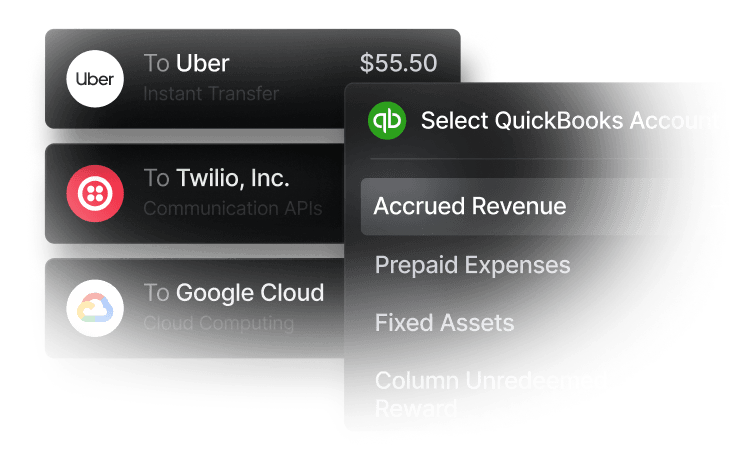
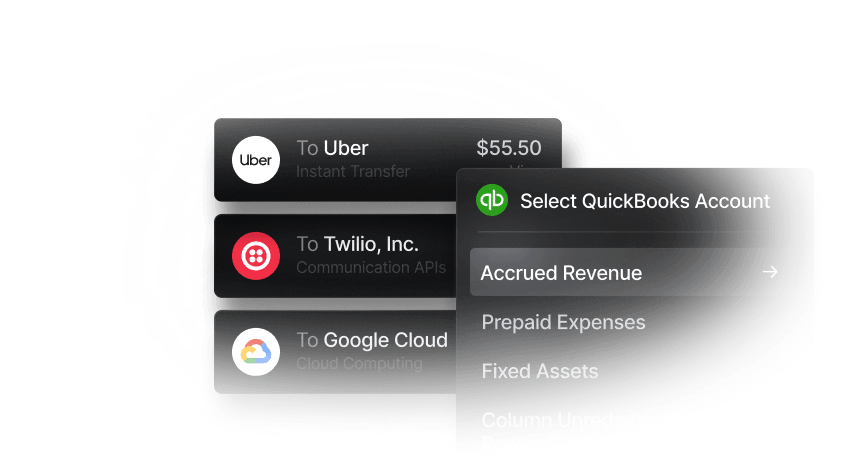
Slash imports your ledger's accounts, vendors and classes and lets you code card and bank transactions against them on one Accounting page before anything syncs. The help center describes the same two-way setup for every ledger it supports. New GL accounts, vendors and classes you add in QuickBooks appear in Slash automatically. BuildPro Construction's customer story reports about 40% less reconciliation work with Slash.
What Slash Does for Your Books
- QuickBooks Online. Slash imports the chart of accounts, vendors, customers and classes, and you push categorized transactions from a Ready to Sync tab, one at a time or in bulk.
- Xero. The Xero connection brings in the chart of accounts, contacts and tracking categories, so you can tag each transaction with Xero's own categories before it syncs.
- Sage Intacct. Slash reads departments, locations, projects and subsidiaries along with the chart of accounts, and you can assign every dimension before the sync.
- NetSuite. The NetSuite sync carries classes, departments, locations and subsidiaries, and it also sends Bill Pay bills and bill payments, so payables reach NetSuite next to card and bank activity.
- Mapping rules and splits. Custom rules categorize transactions by merchant or other criteria, so many reach the In Review tab already coded. A single charge can also be split into several lines with their own categories.
- Card and bank in one connection. Spend on the Slash Visa® Platinum Card and transfers from your checking accounts go through the same review, so the close has one source to check.
"Without Slash, we'd still be relying on spreadsheets to manage our financial backend. Slash has made us much more efficient and allows my team to truly understand where our spending is going."
Rikki Agarwal, Co-Founder & CBO of Blink Digital, on Slash's accounting page
What It Costs
Slash publishes both plans. Free is $0 a month with up to 1.5% cashback on the card, and Pro is $25 a month with up to 2% cashback and $0 on same-day ACH, domestic wires and outgoing FedNow and RTP. Checking is FDIC-insured² up to $150 million through a sweep network of partner banks. The same login runs treasury⁶, invoicing and unlimited virtual accounts.
The pricing page lists QuickBooks Online, Xero, Sage Intacct and NetSuite on both plans. A company that moves from QuickBooks to NetSuite keeps the same plan and connects the new ledger from the same Accounting page.
2. Mercury: GL Codes for QuickBooks Online, Xero and NetSuite, With No Sage Intacct
Mercury also codes transactions before they reach the ledger. Once you connect QuickBooks Online, Xero or NetSuite, Mercury pulls in your GL codes, suggests a code for each transaction from your past choices, and syncs Ready transactions daily by default. You can switch to manual syncing instead. Card spend, wires, ACH transfers and checks can all be coded. The coded sync updates the bank feed entry already in the ledger, so nothing is duplicated.
Classes import from QuickBooks and NetSuite, though Mercury's help center says Xero users can't use them yet. Mercury lists no Sage Intacct integration. Its pricing page keeps QuickBooks and Xero coding free and lists NetSuite categorizations under Mercury Pro, $299 a month billed annually, though its FAQ says enriched NetSuite automations start on a paid plan from $35 a month. A company moving to NetSuite should confirm which tier it needs.
3. Rho: Direct Sync for Three Ledgers, a Daily Bank Feed for Xero
Rho offers two QuickBooks Online connections, and its help center compares them side by side. The bank feed pushes raw transactions to QuickBooks daily for categorizing there. The direct integration maps Rho accounts to your chart of accounts and sends vendors, departments and locations with each transaction. Rho recommends picking one in most cases, because running both can create duplicates.
The direct integration also covers NetSuite and Sage Intacct, with card, checking, treasury and payables accounts each mapped to the ledger. Syncing is manual unless you set up a recurring sync. New accounts added in the ledger appear once you click Refresh Attributes. Rho charges nothing for accounting automation and has no per-user fees. Xero is the one ledger the direct integration skips. Rho's help center describes its Xero connection as a bank feed that passes checking transactions once a day at 3:00 AM EST, so a business on Xero still categorizes in Xero.
4. Brex: Direct Sync on Essentials, Custom Mapping on Premium
Brex offers both routes as well. Its QuickBooks Online support article describes a bank feed that brings Brex business account and card transactions into QuickBooks for categorizing. The direct integration imports your QuickBooks fields and exports card expenses, reimbursements and bills with receipts, memos and mapped GL accounts. Both can run at once, and exported expenses match the feed entries. An automated workflow can export ready transactions to the ledger hourly, daily, weekly or monthly. Brex lists direct sync with QuickBooks Online, Xero, NetSuite and Sage Intacct, among others.
Its pricing page includes accounting integrations, NetSuite among them, on the $0 Essentials plan. Custom mapping with AI rule suggestions, custom fields and support for multiple entities are listed under Premium at $12 per user a month. New GL accounts show up after you refresh the integration. Brex's account requirements ask for equity funding of any amount, more than $500,000 a year in revenue, or a referral, on top of a US EIN and incorporation.
5. Relay: QuickBooks Online and Xero Across Three Connections
Relay connects to QuickBooks Online three ways. Its bank feed sends settled checking and savings transactions every few hours, and leaves card activity to one of the other two. Its Bill Pay connection imports QuickBooks vendors and open bills, then marks them paid once Relay pays them. Its expense management connection pulls your chart of accounts and vendor list, so card spend is coded in Relay and sent with receipts when you click Sync. Xero works the same way. Once either ledger is connected, accounting rules can code recurring merchants automatically.
That layout keeps bills and card coding in Relay and leaves bank transactions to be reviewed in the ledger. Plans run $0 on Starter and $30 on Grow, and Scale is $90 for a limited time, down from $120. Relay's integrations page names QuickBooks Online and Xero as its accounting connections, so a company planning a move to NetSuite or Sage Intacct would be changing banks along with its ledger.
Side-by-Side Comparison
Provider figures reflect publicly published information as of September 2026 and are subject to change.
How to Choose a Bank Account for QuickBooks Online or Xero
- Decide where the categorizing happens. If your bookkeeper prefers to categorize in QuickBooks, any bank feed will do. If you want the month to arrive coded, pick an account that imports the chart of accounts.
- Count the connections. Checking, a card and bill pay on three separate integrations means three sources to reconcile at month end. Slash and Mercury code card and bank activity from one Accounting page.
- Price the ledger you expect to use in two years. Slash, Rho and Brex Essentials code against NetSuite at no plan cost. Mercury lists NetSuite categorizations under Pro, which billed annually is $299 a month or $3,588 a year, so confirm the tier with Mercury before you plan on it.
- Check how new accounts reach the bank. Rho asks you to click Refresh Attributes and Brex asks you to refresh the integration, while Slash picks up new QuickBooks accounts, vendors and classes automatically.
- Read the entry bar before the feature list. Brex's funding, revenue or referral requirement rules out a bootstrapped company under $500,000 in revenue with no referral.
Conclusion
Mercury, Rho, Brex and Relay each code some activity before it reaches the ledger, and each stops somewhere. Mercury puts NetSuite coding on a paid plan and has no Sage Intacct integration, and Rho's Xero connection is a bank feed. Brex asks for funding, revenue or a referral and lists custom mapping under Premium, and Relay covers only QuickBooks Online and Xero, across separate connections.
Slash is the pick when you want card and bank activity coded in one place against QuickBooks Online, Xero, Sage Intacct or NetSuite. All four work on both plans, Free included, and changes made in the ledger reach Slash on their own.
Talk to the Slash team about syncing your ledger with Slash.
Apply in less than 10 minutes today
Join the 10,000+ businesses already using Slash.
FAQs
1. What is the difference between a bank feed and a two-way sync?
A bank feed sends settled transactions into the ledger with a date, an amount and a description, and you categorize them there. A two-way sync also imports the chart of accounts, vendors and classes into the bank, so each transaction is coded before it syncs back. Rho and Brex offer both connections for QuickBooks Online, and Rho recommends running only one in most cases so transactions aren't duplicated.
The Best Accounting Automation Software Tools in 2026

2. Does Slash sync both ways with QuickBooks Online and Xero?
Yes. Slash imports the chart of accounts, vendors, customers and classes from QuickBooks Online, and the chart of accounts, contacts and tracking categories from Xero. You code transactions against that data in Slash and push them from the Ready to Sync tab. Sage Intacct and NetSuite work the same way.
The Best QuickBooks Integrations to Automate Accounting

Top Xero Integrations to Simplify Accounting and Cash Flow

3. Which accounting software does Slash integrate with, and on which plan?
Slash integrates with QuickBooks Online, Xero, Sage Intacct, NetSuite and others. The pricing page lists all four on the $0 Free plan and the $25 Pro plan, so moving to a larger ledger doesn't require an upgrade.
Now Live: Connect to NetSuite and DualEntry
4. Do Slash card transactions need a separate connection from bank transactions?
No. Card spend and bank transfers go through the same Accounting page and the same sync, so one review covers both before they reach the ledger.
Accounting Reconciliation: Types, Process & Best Practices

5. How do new accounts and vendors from QuickBooks get into Slash?
They appear on their own. Slash keeps the chart of accounts, vendors, customers and classes in sync after you connect, so a GL account added in QuickBooks shows up in the categorization dropdowns without a manual refresh.
The Best Accounting Automation Software Tools in 2026


