

The Best Corporate Card and Expense Management Software for Small Businesses: Features, Fees, and Rewards Compared
Corporate card and expense management platforms give employees the ability to spend company funds while helping managers capture receipts, enforce policies, categorize transactions, and monitor budgets. Whether your team’s getting lunch on their break or buying heavy machinery, these systems can help keep each expense above board.
There are quite a few other features small businesses should look out for when hunting for an expense management & card solution, including accounting integrations and cashback rewards. We wrote this guide to help make the search easier. Keep reading to learn what small businesses should expect from corporate card and expense management software and how the leading solutions on the market today differ. One of our top picks is Slash, a business banking platform¹ whose corporate charge card captures and intelligently categorizes each purchase at the moment of purchase. It’s all visible on a real-time dashboard that also houses your treasury account⁶, incoming/outgoing payments, and a lot more.
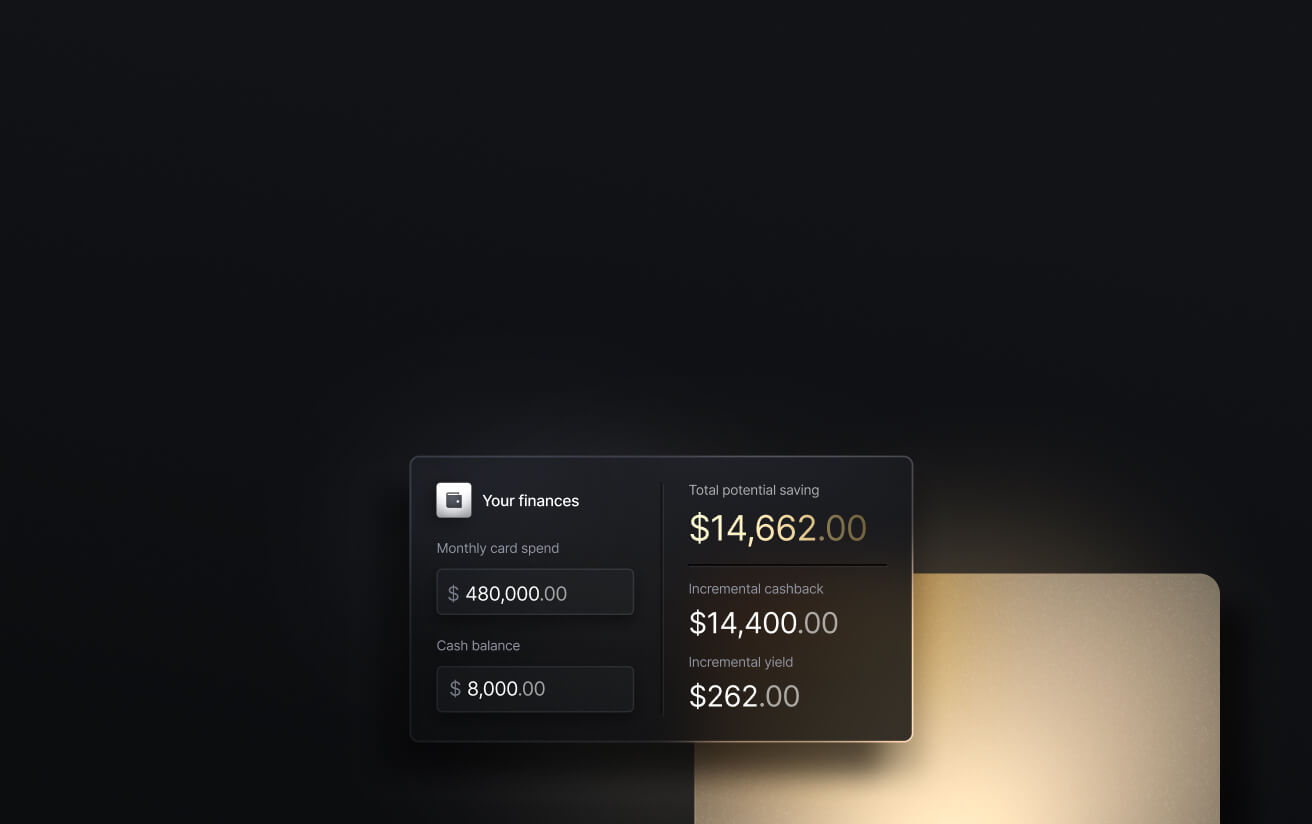
See the ROI behind your spend
Use this calculator to understand impact, then manage and track it all in Slash.

Key Takeaways:
- BILL Divvy’s top multipliers require a weekly repayment cycle. If you switch to monthly, the ceiling drops to 2x. Additionally, no rewards can be redeemed at all during the first 12 months.
- Expensify’s 2% rate takes $250,000 in monthly card spend to reach. Below that threshold the card earns 1%, which is what most small businesses will end up getting.
- Slash comes with unlimited subaccounts, allowing company spend to be organized by employee or category and then capped with a ceiling.
- Ramp asks for $25,000 and Brex for $50,000 in an operating account, while Slash, BILL, Expensify, and Navan publish no balance requirements.
What Small Businesses Need From Corporate Card and Expense Management Software
While small businesses usually have fewer finance employees than mid-sized or enterprise companies, they still face the same control and reporting requirements. A team lead or accountant may approve spending, collect receipts, reconcile cards, and prepare the books while handling several unrelated responsibilities.
That means simplicity’s important. If you run a small business, you probably don’t want anything that comes with months of implementation or a complicated user manual. It’s better to have cards that can be issued quickly, limits that are easy to enforce, automated documentation, and a clean sync into your accounting app.
Another thing to be mindful of is pricing; it’s easy to get tricked by a platform that advertises a lot of features, but then gates them behind an expensive per-user plan. Instead, you’ll want to look for features like receipt capture, physical and virtual cards, configurable approval flows, merchant and category restrictions, budgeting and forecasting tools, and reimbursements under less expensive or free tiers.
Once you find a corporate card and expense management platform that works for you, it can completely change the way your finance team (or person) handles company spend. Some of the main benefits include:
- Less administrative work: Automated receipt collection, categorization, and accounting syncs mean you can save a lot of time that used to be spent on manual spreadsheet typing and month-end follow-up.
- Stronger spending controls: With the ability to set per-card limits and custom approval rules, your employees can make business purchases without actually risking company funds.
- Faster, cleaner closes: When transactions reach your banking platform with receipts, memos, and accounting categories attached, you’ll have fewer exceptions to investigate.
- Better budget visibility: Real-time dashboards show how money’s being spent and where it’s going before the monthly statement arrives. Platforms like Slash also come with unlimited subaccounts, meaning you can segment spend by bucket to make category-specific budgeting easier.
- Card rewards: Almost every corporate card program gives rewards for eligible business expenses. As you evaluate different options, the main questions are how strong the rewards are and whether they come with any complex redemption requirements.
Top 6 Corporate Card and Expense Management Software Options for Small Businesses
While each of the platforms below center their system around a corporate card, they differ in the kind of banking, reporting, and other tools they place around the card. Some focus narrowly on expense tracking, while others can actually work as a small business’s entire financial system. Here are our top picks:
Slash
Slash is an all-in-one solution that gives you business checking, cards & expense management, accounting automations, invoicing, and a lot more on a single dashboard. Any time an employee makes a purchase with the Slash Visa® Platinum Card, it’s instantly visible on that dashboard with codes and categories attached. If the purchase is deemed suspicious, it can be automatically flagged for review and/or frozen by an administrator.
Key Features:
- Automated expense collection: Administrators can establish receipt and memo requirements based on transaction amount, category, or merchant. After an employee uses a Slash card, the platform can send a text or email prompting them to upload the receipt.
- Accounts payable and receivable: Create invoices, track payment status, and collect payments via multiple methods all in your dashboard. For your bills, Slash can parse an uploaded invoice, route each bill for approval, and track its status from pending to paid.
- Accounting automation: Transactions are categorized as they post and carry the accounting dimensions your ledger expects: GL codes, departments, classes, locations, subsidiaries, vendor details, cardholder memos, and receipts. You can set your mapping rules once in Slash instead of reclassifying spend at close.
- Diverse payment rails: Slash supports a wide range of payment methods, including card spend, global ACH, international wire transfers to over 180 countries via SWIFT, and real-time domestic payments through RTP and FedNow. The platform also comes with native crypto on/off ramps⁴ that allow users to send stablecoins like USDT and USDC.
Corporate Card: The Slash Visa® Platinum Card is a corporate charge card that earns users up to 2% cashback on eligible business spend. Unlimited virtual cards and physical cards are available, and each can be coded to a distinct subaccount. No personal guarantee is required.
Downside: At this time, Slash is not available for sole proprietors.
Ramp
Ramp is a banking and spend platform that encompasses cards, expenses, accounts payable, accounting automation, and budgeting. It also handles procurement with the help of AI purchasing software, as well as local currency cards in 30+ countries. However, those features are only available under Ramp’s paid plans.
Key Features:
- Expense automation: Receipt and memo prompts, automatic document matching, real-time policy checks, and optional card locking if and when employees fail to submit their required information.
- AP and procurement: AI-powered invoice capture, approval routing, vendor payments, purchase orders, and three-way matching.
- Integrations: More than 40 accounting and ERP connections, including QuickBooks, Xero, NetSuite, Sage Intacct, Workday, and Oracle Fusion.
Corporate Card: Similar to Slash, Ramp offers unlimited physical and virtual charge cards with merchant, category, and budget controls. However, cashback rates are anywhere from 0%-1.5%, and are solely determined by Ramp when you apply.
Downside: Their cashback rates are below most competitors, and applicants generally need at least $25,000 cash in their operating account. This can shut out a lot of small businesses.
Brex
Brex is geared toward funded startups and larger companies with business travel, global entities, and complex expense policies. Small businesses can use Brex’s free tier to get solid corporate card and expense management tools, while their Premium $12/user/mo tier holds some features that are more tuned to mid-sized companies.
Key Features:
- AI compliance: Automated receipt generation and matching, expense-policy review, accounting suggestions, and risk flags.
- Travel and reimbursements: Travel is one of Brex’s strong suits, with features like integrated booking and VAT documentation. Their card rewards are also centered around travel.
- Bill pay automation: Quick vendor onboarding, itemized invoice capture, and automated approval routing for accounts payable teams.
Corporate Card: Brex’s corporate card comes with a points-based system rather than a cashback system. You get 7x points on rideshare, 4x through Brex Travel, 3x at restaurants, and 2x on recurring software, with 1x elsewhere. However, each point is technically only worth 0.6 cents, so you’ll need to travel a lot to get good value back.
Downside: With a $50,000 minimum balance, Brex is even tougher for small businesses to qualify for than Ramp. Additionally, some advanced expense management policies are only found under their paid tiers.
BILL Spend & Expense
BILL Spend & Expense is the free version of BILL.com’s AP/AR platform, focusing more closely on expense management. It includes budgets, reimbursements, spending controls, and AI-supported documentation, and also comes with unlimited corporate cards.
Key Features:
- Touchless expenses: BILL’s Transaction Agent captures receipts, matches them with transactions, and codes accounting fields using merchant data, receipt details, and prior corrections.
- Budgets and approvals: The platform supports employee/team limits, receipt requirements, approval policies, proactive controls, and real-time tracking.
- Reimbursements: Both standard business purchases and mileage expenses can be reimbursed through BILL, in USD and certain other currencies.
Corporate Card: BILL Divvy Cards are charge cards that can earn up to 7x points at restaurants, 5x on hotels, 2x on recurring software, and 1.5x elsewhere with weekly repayment. On a monthly repayment cycle, however, these rewards drop to 2x max.
Downside: Card rewards require at least 30% monthly credit-line utilization, and can’t be redeemed during the first 12 months.
Expensify
The aptly-named Expensify concentrates on expense reports, receipt capture, reimbursements, and card reconciliation. Businesses can either choose to use the Expensify Card or connect eligible corporate cards they already have. To get Expensify’s full list of expense management features, small businesses may have to upgrade to their paid tiers, which start at a reasonable $5 per user per month.
Key Features:
- SmartScan: Receipts submitted via email, photo, or PDF automatically populate details such as the merchant and transaction amount.
- Policies and reimbursements: “Collect” includes approvals and reimbursements, while “Control” adds custom rules, multiple approval flows, and budgeting.
- Integrations: QuickBooks and Xero are available on Collect, and NetSuite and Sage Intacct are added on Control.
Corporate Card: Unlimited physical and virtual Expensify Cards are available, each supporting auto-categorization and receipt matching. Eligible U.S. purchases earn 1% cashback, only increasing to 2% once monthly card spending reaches $250,000.
Downside: Expensify is a bit light on accounts payable features, and small businesses are rarely going to hit the $250k monthly spending threshold that unlocks 2% cashback.
Navan
Navan’s card and expense management platform is centered more closely around business travel than any other on this list, including Brex. It’s a good pick for small businesses whose spending volume is driven by employee trips rather than vendor invoices or procurement.
Key Features:
- Travel: Policy-controlled booking for flights, hotels, rental cars, and trains, with centralized trip visibility and support.
- Expense automation: Real-time categorization, policy checks, travel-data matching, receipt capture, and employee reimbursements.
- Integrations: Existing card support through Navan Connect, plus QuickBooks, Xero, NetSuite, and Sage Intacct. It also offers API and SFTP connections.
Corporate Card: Like Expensify, you can use your own corporate card with Navan if eligible. The Navan card itself is a P-card (purchase card) with customizable controls and up to 1.5% cashback rewards.
Downside: Navan doesn’t come with too much depth in AP, treasury, or business banking. Expense management is free for five monthly users, then costs $15 per active user.
Comparison Table
Pricing and product details current as of November 2026.
Make the Right Financial Move With Slash
With Slash, you can set card spending limits by individual and category, restrict merchant types where personal purchases are common, and receive real-time alerts when unusual transactions occur or limits are reached. Unlike some of the platforms we’ve discussed, however, Slash’s capabilities don’t end at expense management and card issuance. Slash is an all-in-one financial platform built to help keep as many tools in one place as possible.
Slash comes with working capital lines of credit⁵, high-yield treasury, deep accounting automations and integrations, AP/AR tools, and even more features designed to help teams of all sizes. Small business owners can use Slash’s variety of payment rails to send stablecoins overseas, real-time payments down the street, and SWIFT transfers to more than 180 countries. If you have vendors in places like Mexico or Europe, you can also send money directly through local rails, including SPEI and SEPA.
Here’s what else you get with Slash:
- Integrated treasury: Earn up to 4.06% annualized yield on idle cash through money market funds from BlackRock and Morgan Stanley, managed directly inside your Slash account rather than at a separate custodian.
- Payment processing: Let customers pay your invoices by card, add secure checkout components to your existing webpage, track payments from purchase to payout, and manage your incoming revenue from the Slash dashboard.
- Global USD: The Slash Global Account is designed as an alternative for foreign founders who want access to USD without forming a US entity.³ Accounts are backed on Bridge by a balance held in USDC, which is designed to maintain a one-to-one value with the US dollar.
- Reimbursements: Instead of managing reimbursements across multiple tools, teams can submit, review, and approve reimbursements directly inside the Slash dashboard. Connect your bank account, upload your receipt, and let Slash capture the details.
- Business banking: FDIC-insured business checking,² protected up to $150M through Column N.A.'s insured cash sweep network.
Apply in less than 10 minutes today
Join the 10,000+ businesses already using Slash.
Frequently Asked Questions
How do expense management platforms scan receipts?
Most use optical character recognition (OCR) to pull the merchant, date, total, tax, and sometimes individual line items off a photo or PDF. A matching engine then pairs that receipt to the right card transaction by comparing amount, date, and merchant, and newer systems refine those matches using machine learning trained on your team’s past corrections.
Automated Invoice Scanning: How It Works in Accounts Payable

What’s the difference between a charge card and a credit card?
A credit card lets you carry a balance from month to month, paying interest on whatever you don’t clear. A charge card has to be paid in full on a set cadence, which can be monthly, weekly, or even daily depending on the issuer, so no balance revolves and no interest accrues on standard purchases.
Business Charge Card vs Credit Card: 6 Key Differences You Should Know

Are corporate card rewards taxable?
Cash back and points earned on business purchases are generally treated as a purchase rebate rather than income, which usually means they aren’t taxable when received. The catch is that a rebate reduces the cost of what you bought, so expensing the full pre-rebate amount can overstate your deduction. In any case, it’s good to doublecheck how your cashback corporate cards will be treated with your accountant.
What happens if an employee never submits a receipt?
That can depend on your expense reporting software and the rules you set. Most will send automated reminders by text, app notification, or email, and several escalate from there by flagging the transaction for a manager, blocking new reimbursements, or locking the employee’s card until the documentation arrives.


