

Why Businesses Use Virtual Cards: Key Benefits and Workflows
As companies evolve, they often find themselves delegating spending privileges to employees and task forces from different departments. While corporate cards are a great way to distribute spending, it can be tough to move nimbly and configure guardrails when relying on physical cards. That’s why some businesses have turned to virtual cards.
Virtual cards can simplify expense management, reduce fraud risk, and improve overall control of business spending. Whether you’re issuing cards to individual team members or looking to overhaul the way you pay their vendors, these cards can give you a level of oversight that isn’t always possible with traditional corporate cards.
This guide covers what virtual cards are, how businesses use them in practice, their key benefits and limitations, and how to evaluate whether they belong in your payment workflows. We’ll also take a look at the Slash Visa® Platinum Card, a high-cashback corporate charge card that companies can use to transform the way they spend their money.¹ Slash is a business banking platform that allows users to issue unlimited virtual cards to their team members, each with their own limits, category restrictions, and users.
What Are Virtual Cards?
A virtual card is a digital payment credential that functions like a physical card for online and phone transactions, but exists only in software. Virtual cards are typically issued instantly through a banking or expense management platform, each coming with its own unique card number, expiration date, and CVV. They can also be configured with specific controls before they're ever used, including spending limits, expiration dates, approved vendors, and restricted merchant categories.
It’s important to note that virtual cards are distinct from traditional cards. A virtual card is a format, not a product type. It can sit on top of a credit card program, a charge card program, or a debit card program, depending on how the issuing platform is structured.
The key difference is that a virtual card has configurable controls and a unique number that can be isolated from the company's primary account details. A traditional credit card number, by contrast, is fixed: once shared with a vendor, it's shared indefinitely. Virtual cards can be created fresh for each use case, limiting exposure and making it easy to cancel or modify a single card without affecting anything else.
How Businesses Use Virtual Cards in Practice
Here are some specific ways companies can take advantage of virtual cards:
Paying Vendors and Suppliers
Rather than sharing a company's primary card number with every vendor, businesses can generate a unique virtual card for each supplier relationship that’s pre-loaded with an approved amount and scoped to that vendor. When the payment is complete, the card can be closed or left with a zero-balance ceiling. Finance teams get a clean transaction record tied to a specific vendor, with no risk of that vendor number being reused, duplicated, or charged incorrectly.
Managing Subscriptions and Recurring Payments
SaaS subscriptions, marketing platforms, and cloud services are types of charges that may renew automatically and go unnoticed until they appear on a statement. Virtual cards bring these under control by assigning a dedicated card to each subscription with a monthly cap set to the exact expected charge. When a subscription price changes or a service is cancelled, the card can be adjusted or closed immediately without touching the company's main payment method.
Controlling Employee Spending
When employees need to make purchases on behalf of the business, virtual cards provide a way to give them exactly the access they need without handing over an account. A card can be scoped to a specific category, capped to a ceiling, and set to expire on a particular date. When the employee makes the purchase, the finance team can see the transaction in real time with the context already attached. There’s no reimbursement cycle, and no receipt-chasing after the fact.
Handling Online and Ad Hoc Purchases
For one-time purchases like a conference registration, a piece of software, or a new vendor, a single-use virtual card helps limit exposure. The card number is valid for one transaction, after which it's worthless. Even if the vendor's payment data is ever compromised, there's nothing usable to steal.
What Are the Benefits of Using a Virtual Card?
Virtual cards have several advantages over physical cards, spanning from spend control to ease of reconciliation. Some of these benefits include:
Reduces Fraud Risk and Protects Payment Data
For online transactions, virtual cards are typically safer than physical cards. The core mechanism is isolation: each virtual card has a unique number that can be scoped to a specific vendor, amount, or time window. If that number is compromised, the exposure is contained to whatever the card was configured to allow. A single-use card with a $500 limit cannot be used to make a $5,000 charge, and cancelling it doesn't require issuing a new primary card or notifying every other vendor.
For businesses with high transaction volume or significant online spend, this represents a practical risk management tool that reduces the frequency and severity of payment fraud incidents.
Improves Control and Visibility Over Business Spending
Physical cards operate on trust: the card is issued to an employee, and the finance team finds out what was spent when the statement arrives. Virtual cards invert this. Controls like spending limits, expiration dates, approved vendors, and merchant category restrictions are configured before the card is used. This means the parameters of a purchase are defined upfront, not reviewed after the fact.
Expense management is shifted from reactive to preventive. Overspending doesn't happen because it can't happen; the card simply won't authorize a transaction outside its defined parameters. Finance teams spend less time reviewing exceptions because fewer exceptions occur.
Simplifies Expense Management and Reconciliation
Every virtual card transaction carries rich data that describes who spent, how much, with which vendor, and against which budget. When virtual cards are integrated with an accounting platform, this data can flow directly into the general ledger without the need for manual transcription. The Slash Visa® Platinum Card connects two-ways with QuickBooks Online, Xero, and Sage Intacct, meaning every expense made with the Slash Visa® Platinum Card is automatically categorized and ready for reconciliation. Month-end close becomes faster because the data is already organized, and audit trails are complete because every transaction has a corresponding card record.
Speeds Up Payments and Improves Operational Efficiency
Generating a virtual card takes seconds. Compared to the process of setting up a new vendor in an AP system, getting a check approved, or waiting for a physical card to arrive, virtual cards dramatically compress the time between a purchase decision and a payment execution. For fast-moving teams, this speed translates directly into operational agility.
Enhances Cash Flow and Financial Planning
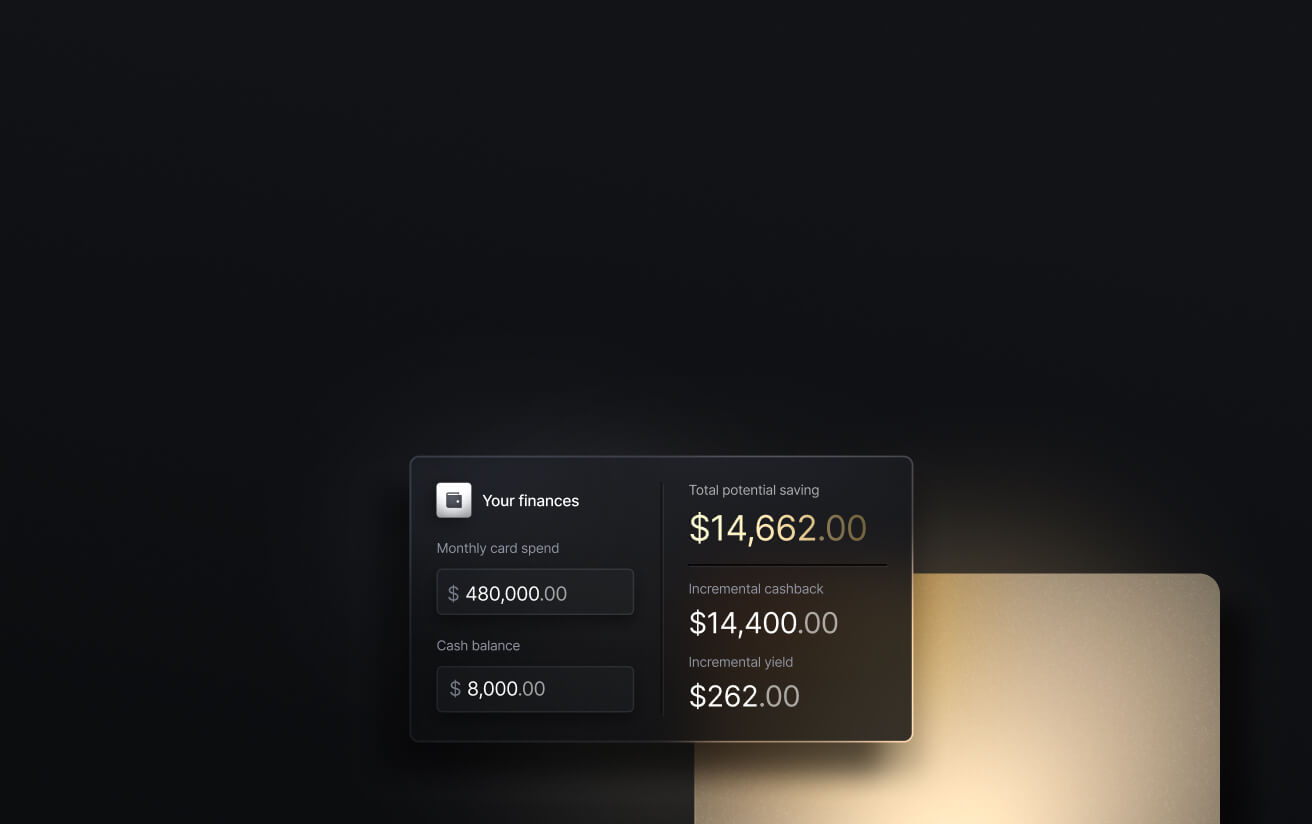
Virtual cards improve visibility and control in ways that support better cash flow management. When every dollar spent is tracked in real time, categorized correctly, and visible to the finance team as it happens, forecasting becomes more accurate and surprises at month-end become rarer. Some virtual cards offer another cash flow advantage: more cash. The Slash Card allows users to earn up to 2% cash back on every business purchase, putting valuable capital back into the pockets of finance teams that work with slim margins. Getting returns on everyday expenses can give your budgets a little extra breathing room.
See the ROI behind your spend
Use this calculator to understand impact, then manage and track it all in Slash.

How Does a Virtual Credit Card Work?
The mechanics of a virtual card transaction follow a defined sequence:
- The business submits an approved payment file or generates a card through its virtual card provider.
- A unique virtual card number is created for the specific payment amount, vendor, or time window.
- The card details are securely delivered to the vendor or used directly by the employee making the purchase.
- The payee processes the transaction through its own bank or payment terminal.
- The transaction is authorized against the card's configured parameters, settled, and posted to the company's account.
- The transaction record is captured, categorized, and synced to the company's accounting system.
Each step is contained and auditable. The card number used in the transaction is unique to that payment, meaning the audit trail connects directly from a specific business decision to a resulting financial outcome.
How to Get and Set Up Virtual Cards for Your Business
Getting started requires choosing the right provider and configuring cards to fit the business's actual payment workflows. Here’s how this might look:
Setting Up Access to Virtual Cards
Virtual cards are typically accessed through a business banking platform, a corporate card program, or a dedicated expense management tool. Setup involves connecting the virtual card issuance capability to the business's underlying account, which may be a checking account, a credit facility, or a charge card program depending on the provider. Most modern platforms complete this in a day or less, as there's no hardware to deploy and no lengthy procurement process.
Issuing Virtual Cards on Demand
Once access is established, cards can be generated instantly for specific use cases like a vendor payment, an employee expense, a software purchase, or a one-time transaction. The card is created with its controls pre-configured and delivered to the person or system that will use it. At scale, this can be automated: platforms with API access allow cards to be generated programmatically as part of larger payment workflows, without manual intervention for each issuance.
Configuring Controls and Usage
This is where virtual cards earn their value. Each card can be configured with a spending limit (daily, total, or per-transaction), an expiration date, approved merchant categories, or a single approved vendor. Controls can then be adjusted after issuance. For instance, if a project budget increases or a subscription price changes, the card limit updates in real time rather than requiring a new card. Teams can define approval requirements for cards above certain thresholds, embedding spend governance directly into the issuance process.
Integrating with Financial Systems
The final configuration step is connecting virtual card transaction data to the accounting or ERP system. Most platforms offer direct integrations with solutions like QuickBooks Online, pushing categorized transactions into the general ledger as they occur. This eliminates the manual import or re-entry of card data at month-end and keeps the books current in real time. For businesses with custom systems, API access enables more flexible integration arrangements.
What Are the Disadvantages of a Virtual Card?
Virtual cards may not cover every payment scenario. Understanding their limitations helps businesses use virtual cards where they add value and maintain other payment methods where they don't. Here are some factors to look out for:
Limited Use in Certain Offline Scenarios
Virtual cards work for online and phone transactions, but they can't be tapped at a point-of-sale terminal or inserted into a card reader. Physical cards will remain necessary for businesses with employees who make in-person purchases like office supplies, travel expenses, or client lunches. Many platforms, including Slash, issue both virtual and physical cards under the same program and allow the two to coexist without separate accounts.
Not Always Suited for Long-Term Recurring Payments
Single-use or time-limited virtual cards are excellent for one-time transactions, but they create friction when applied to long-running vendor relationships with variable invoice amounts. If a card is set to expire or is cancelled after a payment, a subscription or recurring invoice may fail to process, requiring manual intervention to reissue credentials. Businesses need to be intentional about which cards are scoped for recurring use versus one-time transactions.
Dependency on Systems and Integrations
Virtual cards exist in software, which means they depend on the platform that issues them. If the provider experiences downtime, or if an integration to an accounting system breaks, the payment workflow can be disrupted in ways that a physical card wouldn't be. Businesses with critical payment timelines should have contingency processes for platform outages, and should periodically verify that integrations are working as expected rather than assuming they're running in the background correctly.
Varying Acceptance Across Vendors and Regions
Most major online vendors accept virtual card numbers without issue, since they're just a card number processed through Visa or Mastercard rails. But some vendors, particularly smaller ones in certain markets, may require a physical card on file or may not support the specific card type issued by the virtual card provider. For businesses with significant international vendor spend, it's worth confirming acceptance before building a payment workflow around a specific virtual card program.
The standard in finance
Slash goes above with better controls, better rewards, and better support for your business.


How to Evaluate If Virtual Cards Fit Your Business Workflows
Virtual cards aren't a replacement for every payment method. They're one component of a broader payment strategy, and whether they're the right fit depends on how the business actually operates. Here are a few questions worth asking:
- Do you manage a high volume of online or vendor payments where unique card numbers per transaction would reduce fraud exposure and simplify reconciliation?
- Do you need tighter control over employee or departmental spending, where pre-configured limits and restrictions would prevent policy exceptions before they happen?
- Are you looking to improve transaction visibility and reconciliation speed, where real-time data flows would reduce month-end manual work?
- Do your current payment methods create gaps in tracking or control, such as subscriptions that auto-renew without visibility, reimbursement cycles that lag behind actual spend, or card statements that arrive after decisions have already been made?
Beyond the operational considerations, reward structures are worth evaluating carefully. Cash back on card spend is a direct return on payments that would happen regardless of the payment method. Platforms like Slash that offer meaningful cash back rates can generate material returns for businesses with significant card spend, turning what was previously a cost center into a modest source of value.
Manage Virtual Corporate Cards with More Visibility with Slash
When virtual cards are embedded in the right workflows, you’ll have fewer exceptions to manage, cleaner books at month-end, and relaxed finance teams who spend less time on retrospective reconciliation and more time on forward-looking decisions. If you’re a fan of using physical cards to make in-person purchases, you might not find it easy to choose between the two. With Slash, you don’t have to.
Slash offers both virtual and physical charge cards within a platform that connects spend controls, transaction tracking, and accounting in a single place. With the Slash Visa® Platinum Card, spend controls are configured at the card level and transactions are captured with receipt prompts at the point of purchase.
Every card transaction is visible in real time on our integrated dashboard, along with any other payment rails your company utilizes. This data flows automatically into accounting platforms like QuickBooks, Xero, and Sage Intacct, vastly reducing the burden of manual data entry. The moment a transaction posts on a Slash Card, it’s automatically categorized and synced with your accounting system.
Our platform’s unlimited virtual cards give teams the ability to widely disperse spending power without losing financial visibility or control. Admins can issue cards to employees with embedded rules that can establish spending ceilings and limit access to certain vendors or categories. No matter its rules or limits, all virtual cards can still earn up to 2% cash back on business purchases.
Other helpful Slash features include:
- AI-powered finance: Our platform comes with Twin, a built-in AI agent that can be prompted with natural language to complete complex tasks. Users can ask it to create cards, pay invoices, review your cash flow, and much more.
- Working capital financing: Access short-term financing with flexible 30-, 60-, or 90-day repayment terms to help bridge cash flow gaps.⁵
- Diverse payment methods: Slash supports a wide range of payments, including card spend, global ACH, international wire transfers to over 180 countries via SWIFT, and real-time domestic payments through RTP and FedNow.
- High-yield treasury: Earn up to 3.83% annualized yield on idle funds with money market investments from BlackRock and Morgan Stanley, managed directly within your Slash account.⁶
- Native cryptocurrency support: Hold, send, and receive USD-pegged stablecoins USDC and USDT across eight supported blockchains for faster, lower-cost global payments.⁴
With Slash’s unlimited virtual cards, your employees can purchase exactly what they need to and earn cash back while they do it.
Apply in less than 10 minutes today
Join the 10,000+ businesses already using Slash.
Frequently Asked Questions
Are there any fees associated with using virtual cards?
It depends on the provider. Virtual Slash Cards are free to issue and use, coming with no monthly fees or per-transaction fees.
Ramp vs. Brex vs. Slash: Which is Best for Your Business?


What are some considerations to keep in mind when using virtual credit cards?
While virtual cards are flexible, businesses that routinely make in-person purchases will likely have to hang on to a physical card for convenience with some merchants. Companies with a wide range of international vendors may also run into obstacles, depending on region-specific restrictions.
How to Choose the Right Corporate Credit Card Program
How Does Cash Back Work? Choosing the Right Credit Card Rewards Program
Can virtual cards be stored on digital wallets?
Usually, yes. For example, Slash Cards can be added to digital wallets like Apple Pay and Google Pay. From the Slash app/dashboard, open the card you want to add and use the Add to Apple Wallet / Add to Google Wallet option, or manually add the card by entering its details and virtual number in your wallet app.
How do virtual credit cards enhance security and fight fraud?
Virtual cards inherently provide tighter security, as even when account numbers are compromised, the parent bank account cannot be reached. Many cards also come with their own security features, such as automatic flagging for suspicious transactions.
Corporate Credit Cards: Management and Automation


