


Why Project Cost Management Matters for Construction in 2026
Most general contractors didn't get into construction to spend their evenings reconciling bank statements. But somewhere between managing four active jobs, chasing sub invoices, and trying to figure out why one project's cash keeps going missing, that's exactly where they end up. The financial side of construction can be complicated: money moves in and out of multiple projects simultaneously, costs are tracked across dozens of subs, and a single miscoded card purchase can throw off a job's budget for weeks.
That's started to change. A new generation of financial platforms has made it possible to more easily separate project funds, automate cost tracking, and get a real-time view of spend across every active job, without a team of accountants or a custom ERP implementation. The capabilities that used to be available only to large commercial firms are now accessible to contractors running a handful of jobs out of a small office.
For contractors who have outgrown spreadsheets and disconnected bank accounts, Slash is a business banking platform well equipped for managing finances across multiple jobs.¹ Each project gets its own subaccount so funds don't blend between jobs. The Slash Visa Platinum Card earns up to 2% cash back and lets you set per-card limits, merchant restrictions, and cost-code tags for everyone in the field. And every transaction syncs automatically to a real-time dashboard so you can see how each job is tracking against budget at a glance.


What Is Project Cost Management in Construction?
Project cost management is how a contractor handles estimating budgeting and controlling costs so a project finishes within the approved budget. It covers a few connected activities: estimating the cost of the work, setting an approved budget, arranging the financing to fund it, and managing spend while the job is underway. Here are the four key drivers that determine your management process from the outset:
- Scope: The full extent of work you've contracted to deliver. It is the basis for every cost estimate, because you can only price work that has been defined. When the owner adds or changes work, the budget has to be re-estimated rather than quietly absorbed.
- Schedule: The timeline for completing a project. Delays are costly: paying for site supervision, the trailer, utilities, and equipment rentals can drive you well over what you bid.
- Procurement: The process of buying materials and awarding subcontracts. Because materials costs are one of the biggest drivers of cost for most projects, the terms you negotiate with your suppliers will have a massive effect on how you can ultimately set your full budget.
- Risk management: Identifying what could go wrong and accounting for it in the budget. It determines how much contingency (a reserve held for unknown outcomes) you should carry, from undiscovered soil conditions or a volatile steel market.
The terms "job costing" and "project cost management" sometimes get used interchangeably, but they aren’t the same thing. Job costing is the accounting record, and it’s the process of tracking funds spent on a project; many general contractors have shifted to using automated expense management systems to keep track of costs. Project cost management encompasses the wider set of decisions made around job costing: management is the process of defining how the budget is built and approved, who is allowed to authorize spending, and how the team responds when actual costs begin drifting from the plan.
A cost management plan should be written during preconstruction, before any work starts, and updated whenever the numbers change in a major way. Some key review points may be when you submit the bid, when the contract is awarded, when a major change order is approved, and at substantial completion.
Why Cost Control Is Critical for Construction Companies
Construction runs on thin margins. Many general contractors operate on net margins in the 5% to 15% range. When the cushion is that small, a 5% cost overrun can erase a substantial portion of profit on a job. The importance of cost control is in the name: control. In an industry where scope can change with the weather, it’s important to maximize the areas that you can control.
Cost control protects against three problems in particular: budget overruns, underbilling (spending more than you've invoiced), and the cash crunches that hit when retainage and slow-paying owners stretch receivables past 60 or 90 days.
The importance of strong cost control goes beyond just one project, too. A contractor who trusts their numbers can price lump-sum and GMP (guaranteed maximum price) work without padding the estimate – padding that can lose the job to a sharper bidder or hand margin back to the owner. Banks, bonding companies, and investors study a contractor's historical job margins and WIP (work-in-progress) reports before setting credit and bonding limits, so a consistent record of hitting budgets can earn you more capacity to take on work.
A banking and card platform like Slash gives owners a real-time view of spending, which is what makes the following three benefits possible:
- Fewer overruns on fixed-price and GMP jobs. A $2.5M multifamily renovation can finish 8% over budget because small "while you're here" changes were never written up or field purchases were never properly recorded. Slash Cards record every transaction in real time, feed details and receipts into your dashboard, text team members if they haven’t uploaded supporting documentation, and automatically categorize every transaction for your ledger.
- Steadier cash flow. When you have a clear view of actual costs month by month, you can be more confident when you schedule payroll, rent equipment, or order materials. With Slash, you can get a live look of your cash flow and top suppliers in the analytics dashboard; or, if you’re anticipating a shortfall, you can access a short-term line of credit to cover working capital.⁵
- More credibility with owners, GCs, and lenders. A report that shows your budget, committed costs, actuals, and forecast together can make change-order conversations easier. With Slash, you can get our built-in AI assistant, Twin, to analyze your spending trends to see how your actuals line up with projections; it can even generate graphical representations for you.
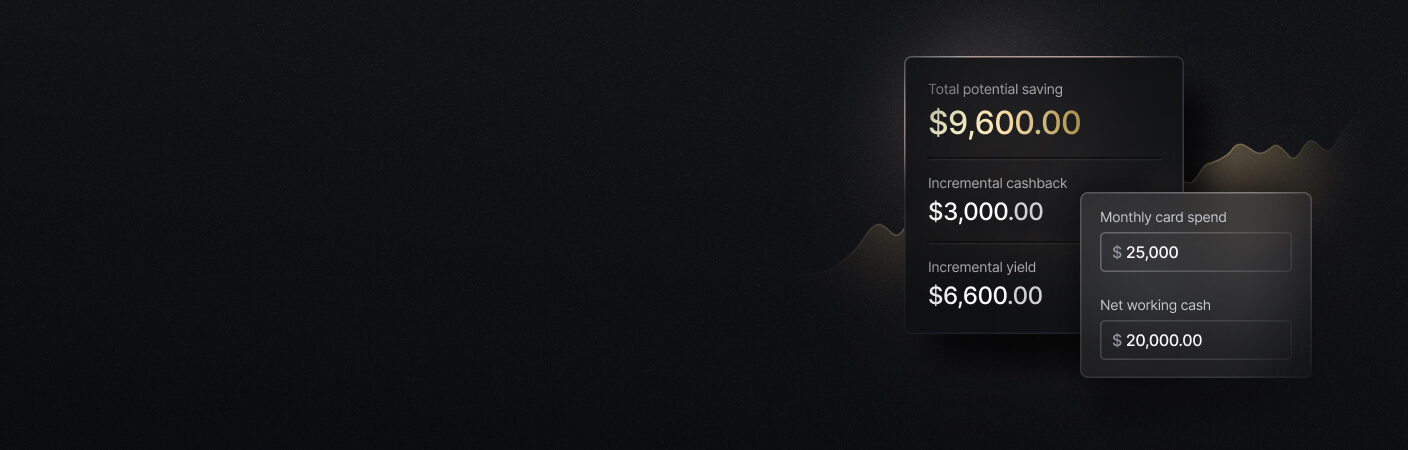
See the ROI behind your spend
Use this calculator to understand impact, then manage and track it all in Slash.

Common Cost Management Challenges for Construction Firms
Managing cost is harder in construction than in most industries for structural reasons. The work happens in the field and away from the office, which means people who never see the budget are often the ones making spending decisions. Weather delays can move both the schedule and the cost, change orders may derail the job mid-build, and it’s up to your team to adjust to changes on the fly without a clear idea of how to spend them.
Sometimes, bad tooling can make it worse. Many firms still track costs through a mix of paper receipts, fuel cards, and manual job cost spreadsheets; each of those is a place where information can go missing or out of date. Here are some of the challenges that can come from using the wrong financial tools; if your team is encountering one or more of them, it’s worth considering a switch:
- Inaccurate estimating and outdated pricing: Materials costs change like the seasons. The fix is to calibrate new estimates against your own historical job cost data, broken out by cost code and region, and to keep a current catalog of unit costs so estimates start from real numbers rather than memory. Getting recent job cost data starts with a better way to track expenses.
- No real-time visibility from the field: When a foreman buys materials on a personal card and turns in the receipt late, the project manager has no view of that spending until month-end close. By then, the early signs of an overrun on self-performed work like concrete or carpentry are weeks old. Job-specific corporate cards, each with spend limits and tracked cost codes, put every purchase on the right project the day it happens.
- Disconnected systems: Separate tools for bank accounts, fuel cards, purchase cards, accounts payable, accounts receivable, and job cost accounting – it’s a lot to keep track of. Manually piecing it all together is how duplicate payments slip through, early-payment discounts get missed, and cost trends show up too late to act on. An integrated platform that syncs transactions and vendor records with an accounting package such as QuickBooks, Sage Intacct, or Xero removes most of the re-entry and puts the numbers in one place.
How to Manage Project Costs Step-by-Step on a Live Job
Cost management on a live job runs from notice-to-proceed through final closeout. Here's how each step works in practice.
Step 1: Align scope and contract type
Before any work starts, make sure everyone agrees on what's included and what isn't. Your contract type matters here because it determines who absorbs cost overruns. With a lump-sum contract, that's the contractor. With cost-plus, it's the owner. A GMP splits the difference. Nail down how escalation, fuel surcharges, and material substitutions will be handled before you mobilize, not after.
Step 2: Set up your job cost system
Get the job into your accounting software before spending starts. Use cost codes that match your estimate so you can compare actuals against budget line by line. This setup supports cost budgeting and creates the cost baseline used to monitor project performance, giving you a clear benchmark for later comparisons. Connect the job to dedicated bank accounts and issue project-specific cards to your superintendents and PMs. Every purchase made on those cards posts to the right job automatically, which saves a lot of cleanup later.
Step 3: Lock in materials and subcontracts
Order long-lead items like structural steel, roofing, and mechanical equipment as early as possible. Prices and material costs can move significantly over a 10-month build, and locking in early limits your exposure. For everything else, write purchase orders tied to specific budget lines so cost budgeting allocates costs to specific project tasks and commitments, and run invoices through AP automation so they're checked against the PO before anything gets paid.
Step 4: Track field costs daily
Have supervisors log labor hours, productivity, time, and equipment usage by cost code every day or week, and make sure that data flows into job costing promptly so budget-impacting inefficiencies in project activities are easier to catch early. When field staff buy on corporate cards and photo receipts on the spot, costs show up fast enough that a PM can respond the same week something starts running over. Real-time tracking tools help monitor costs by giving up-to-date information on expenditures and support controlling costs and cost estimation throughout the project lifecycle, improving visibility into project progress across the project lifecycle.
Step 5: Review variances monthly
Regularly compare budgeted amounts with actual costs and the baseline forecast for each major cost category, so you can see how actual costs compare and measure cost performance. Use that review to compare actual costs in a clear check on project spending. A short monthly variance analysis plus quick cost audits helps identify overspend early and update the budget as actual costs become known. The things to watch: labor cost per unit creeping up, materials running ahead of plan, and subcontractors billing faster than the work is progressing. Update your margin forecast and share it with finance and ownership.
Step 6: Manage change orders promptly
When a change comes up in the field, get it priced and documented within days. Tag every related cost to the change order number from the start, whether that's a vendor invoice, a card purchase, or payroll hours. Keep pending change orders separate from approved ones in your cost report so your margin stays accurate.
Step 7: Close out and capture lessons
When the job wraps, compare final actual costs and estimated costs against the initial budget line by line to understand overspend, using variance analysis and historical cost data from past projects to see where the biggest gaps were and why. Feed that review back into your estimating process with historical data so your next bid is sharper and planning improves on future projects. Archive everything, job cost records, bank statements, card transactions, somewhere you can pull it quickly if there's ever an audit or a dispute.
Using Technology and Financial Platforms to Track and Control Project Costs
In 2026, project cost management depends on several types of integrated software and financial tools. What matters most is how they work together, because cost data starts in the field and has to reach the office intact.
- Job cost and project management software: Tools like Procore, Autodesk Build, or a construction ERP function as project cost management software to manage budgets, commitments, and cost events. They're only as accurate as the data they receive, so they perform best when banking, card, and AP systems feed them clean numbers on time.
- Corporate cards with job-level controls: Generic cards without controls lead to lost receipts, miscoded expenses, and fraud exposure. The features that matter are per-card spend limits, merchant category restrictions, and cost-code tagging on every transaction.
- AP and AR automation: AP automation captures an invoice, routes it for approval based on the project and amount, and syncs the approved bill to accounting, cutting down on missed discounts and duplicate payments. On the AR side, that means progress billings, retainage, and change-order billing to owners.
- Accounting integrations and real-time analytics: Syncing cost data across banking, cards, AP, and accounting removes the manual re-entry that introduces errors. Integrated project data improves visibility into project performance, and cost management software supports better value management. Advanced platforms can also support earned value management EVM by combining cost, schedule, and progress data to measure cost performance against the baseline throughout the project.
Slash connects the financial side of that chain for contractors running multiple projects and entities. Cards, banking, and outbound payments to suppliers and subs all run from one dashboard, with direct sync to QuickBooks Online, Xero, Sage Intacct, and NetSuite. Every card comes with per-card spend limits, merchant category controls, and cost-code tagging, so field purchases post to the right job without manual cleanup. The card is a charge card with up to 2% cash back, meaning balances are paid in full each cycle rather than carried as debt.
Best Practices for Effective Project Cost Management in Construction
A handful of habits separate the contractors who hit their margins consistently from those who don't. They are worth applying on every project, not only the large ones, because the routines that catch problems form on the small jobs first:
- Standardize cost codes and reporting: Use one cost code structure across the company so that estimates, budgets, and actuals can be compared from one year to the next and across similar building types. Shared budget and WIP templates keep every project manager reporting in the same format.
- Put field, office, and finance on the same numbers: Everyone should work from one set of cost data and one set of definitions. A short weekly or biweekly call, where finance shares the current cost picture and the field shares progress and expected changes, keeps the three groups aligned.
- Make real-time visibility the default: Move away from reporting only at month-end toward a daily or weekly view. A workable standard is that any purchase over a set amount appears in the system within 24 hours for approval, and that an alert fires when a cost code reaches a certain portion of its budget.
- Plan for risk, not just base cost: Size contingency to the actual risk of the job, since a complex renovation for a new client warrants more than a greenfield build for a repeat customer. Keep a company-level cash reserve as well, to absorb the timing gaps that construction cash flow creates.
- Use banking and treasury tools to support the work: Cash sitting idle between large pay applications can earn a return in a high-yield treasury account. Keeping funds separated by entity and project also prevents a profitable job from quietly covering for a struggling one.
How Slash Helps Construction Companies Manage Project Costs
Consider a contractor running four jobs at once across 2025 and 2026: two tenant improvements, a warehouse shell, and a multifamily renovation. Each job can have its own FDIC-insured checking account and its own project-tagged cards, so funds stay separated and the office can see available cash and spend per project in real time, rather than discovering at month-end that one job's cash was covering another's bills.² The cards in the field have preset limits, merchant rules, and cost-code tags, plus instant freeze and alerts for spending outside policy, and every transaction syncs to accounting. That’s what Slash offers.
- Slash centralizes ACH, wire, and card payments to suppliers and subcontractors with approvals mapped to project roles.
- The Slash Visa Platinum Card earns up to 2% cashback on project spend, plus enables you to set granular spend controls to help you keep subs from going over budget. Every purchase is tracked, categorized, and ready to reconcile from your Slash dashboard.
- Slash Capital financing provides a line of credit with 30, 60, or 90-day draw terms to keep payments moving without delaying subs.
- Contractors managing multiple entities can view spend, available funds, and cash flow trends at both the portfolio and project level from one dashboard.
- Direct integrations with QuickBooks Online, Xero, Sage Intacct, and NetSuite keep everything in sync with the books so banking and card activity becomes usable job cost data rather than another system to reconcile.
If you’re a GC that’s tired of untangling the mess of your project costs, get started with Slash today to get smarter cards, better tools, and leading rewards.
Apply in less than 10 minutes today
Join the 10,000+ businesses already using Slash.
Frequently Asked Questions
What's the difference between job costing and project cost management?
Job costing is the accounting practice of tracking the actual costs charged to each project and cost code, so you know what a given trade or phase really cost once the work is done. Project cost management is the broader discipline of estimating, budgeting, financing, and controlling those costs, including the approvals and processes that govern spending before it happens. In short, job costing records what was spent, and project cost management decides how spending is planned and held in check.
Best Expense Management Tools for Startups in 2026

How much contingency should a construction project budget include?
Contingency commonly falls in the 5% to 10% range, but the right figure depends on the project's risk. A complex renovation, a tight urban site, or a job with unknown underground conditions justifies more, while a straightforward greenfield build for a repeat client may need less. The aim is to size the reserve to what could realistically go wrong, not to apply a flat default.
How can a contractor get real-time visibility into project costs?
The most direct way is to issue job-specific corporate cards tagged to cost codes, so every field purchase posts to the right project as it happens, and to connect those cards, bank accounts, and AP to the accounting system. That combination replaces month-end reconciliation with a current view of cost. A platform like Slash brings cards, banking, and analytics onto one dashboard so the data stays current across several jobs at once.
Corporate Card Controls: How to Better Manage Employee Spending

Read more from us


